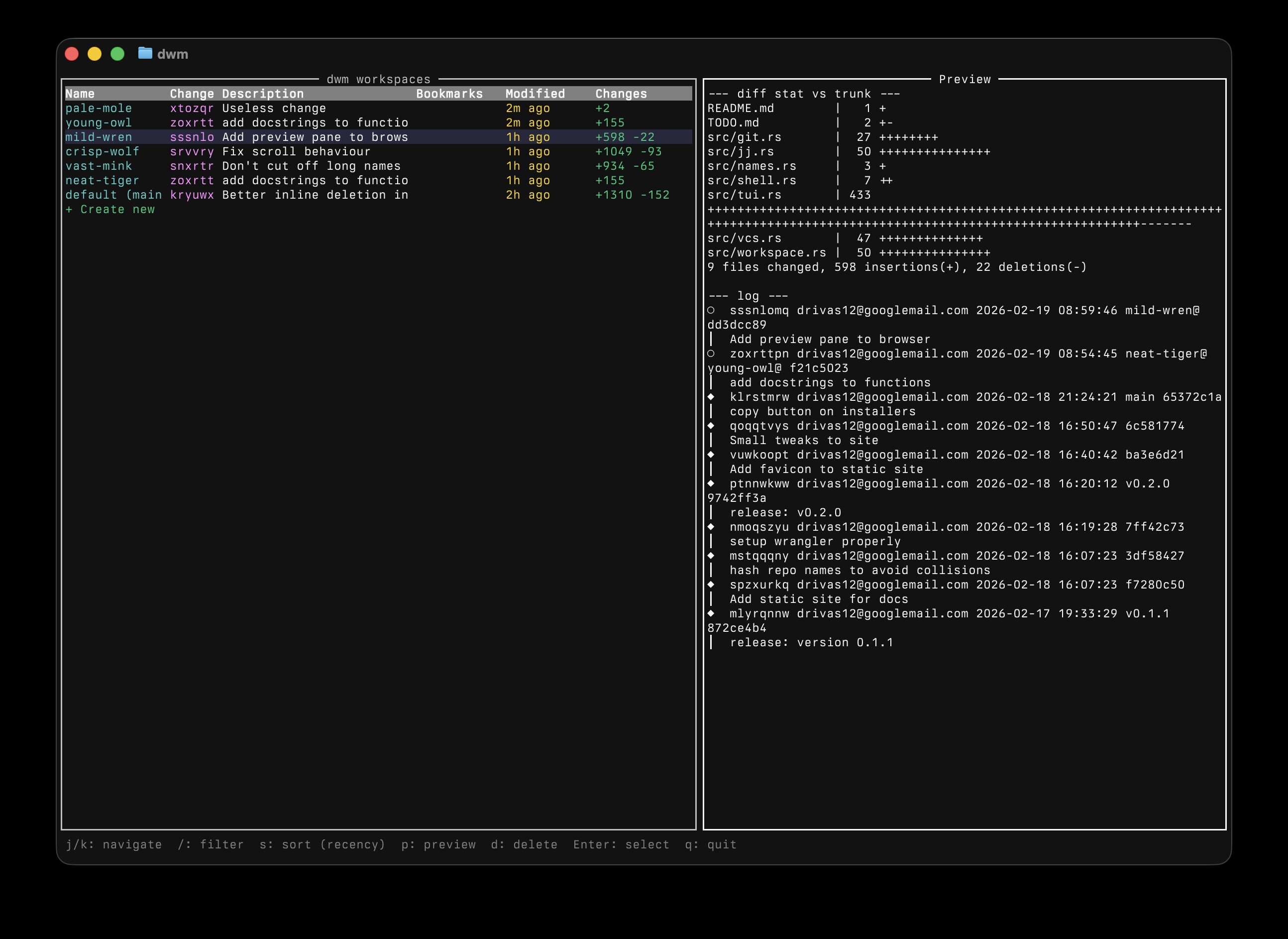
Suddenly everyone is building multi-agentic workflows on top of git worktrees, and there are a lot of apps to manage them. Most of them do too much, and they don't support jj workspaces. Here is mine, which aims to do as little as possible while remaining useful.
dwm (pronounced "doom") creates, lists, and deletes workspaces stored under
<repo>/.dwm/worktrees/<name>/, with a shell wrapper that
auto-cds into the selected workspace. It works with both jj and git
repositories.
The first time you create a workspace in a repo, dwm adds .dwm/ to your ignore
rules — .git/info/exclude for git repos, .gitignore for
jj-only repos — so workspace directories never end up tracked.
It provides an interactive TUI picker for browsing and switching between workspaces, with filtering, sorting, and inline deletion. It will also show a live-updating summary of Claude Code sessions that are running in each workspace.
My workflow looks like this: dwm new to create and move to the new worktree,
and then claude to open my coding assistant of choice. Once my changes are
done, I run dwm delete to clear up the worktree. If I'm switching between
long-lived tasks, I use dwm list to see my open workspaces.
Shell installer (macOS and Linux):
curl --proto '=https' --tlsv1.2 -LsSf
    https://github.com/drivasperez/dwm/releases/download/v1.0.1/dwm-installer.sh | sh
Homebrew:
brew install drivasperez/tap/dwmCargo:
cargo install dwmPre-built binaries are available on the latest GitHub release.
`dwm` needs to add a small snippet to your shell config in order to be able to switch
directories for you. Run dwm setup interactively and it will offer to add the
wrapper to your shell config and set up agent hooks automatically:
dwm setupOr add it manually:
Bash / Zsh — add to .bashrc or .zshrc:
eval "$(dwm shell-setup)"Fish — add to ~/.config/fish/config.fish:
dwm shell-setup --fish | source
This wraps the dwm binary so that selecting a workspace automatically
cds into it.
After dwm new creates a workspace, it can run a setup script (e.g.
npm install, copy .env, …) so the workspace is immediately usable.
Configure it via .dwm.toml at the repo root:
[scripts]
setup = "npm install && cp ../main/.env .env"
# `run` and `archive` are reserved for future lifecycle hooks; parsed but not invoked yet
If .dwm.toml is absent but a
Conductor
conductor.json exists at the repo root, dwm reads
scripts.setup from it as a drop-in fallback. Conductor-specific fields like
runScriptMode and enterpriseDataPrivacy are accepted and ignored,
so an existing conductor.json works without edits.
The script runs as sh -c "<command>" with the new workspace as its
working directory. Stdout and stderr from the script are forwarded to dwm's stderr (dwm's
stdout is reserved for the path the shell wrapper cds into). A non-zero exit
prints a warning but doesn't unwind — the workspace is still created and you're still
cdd into it.
The script sees these environment variables:
jj or git--from <name> value, if providedDWM_REPO_ROOT, for Conductor compatDWM_WORKSPACE_PATHDWM_WORKSPACE_NAME
dwm can show the status of
Claude Code agents running in
your workspaces. The TUI's "Agent" column displays per-workspace counts like
2 waiting, 1 working.
To set it up, run:
dwm setupThis installs Claude Code hooks that report agent status to dwm.
dwm --version)
┌──────────────────────────┐
│░░░░░░░░░░░░░░░░░░░░░░░░░░│
│░░░░░░░░░░░░░░░░░░░░░░░░░░│
│░░░░░░░░░░░░Hello░░robot░░│
│░░░░░░░░░░░░░░░░░░░░░░░░░░│
│░░░░░░░░░░░░░░░┌┐░░┌┐░░░░░│
│░░┌┐░░░░░░░░░░░└┘░░└┘░░░░░│
│░░││░░░░░░░░░░░░░░░░░░░░░░│
│░░└┘░░░░░░░░░░░░░░░░░░░░░░│
│░░░░░░░░░░░░░░░░░░░░░░░░░░│
│░░░░░░░░░░░░░░░░░░░░░░░░░░│
│░░░░░░░░░┌─────────────┐░░│
│░░░░░░░░░│▚▚▚▚▚▚▚▚▚▚▚▚▚│░░│
│░░░░░░░░░└─────────────┘░░│
│░░░░░░░░░░░░░░░░░░░░░░░░░░│
│░░░░░░░░░░░░░░░░░░░░░░░░░░│
└──────────────────────────┘